> ## Documentation Index
> Fetch the complete documentation index at: https://docs.r5r.dev/llms.txt
> Use this file to discover all available pages before exploring further.
# Account Management
> Managing your R5R profile, settings, and linked accounts.
# Account Hub
The [Account Center](https://r5r.dev/account.php) is your central hub for managing your R5Reloaded presence. It is divided into several tabs:
## Core Features
* **Overview**: A snapshot of your account and "For You" feed.
* **News**: Read the latest announcements from the R5R staff.
* **Profile**: Customize your public appearance.
* **Avatar & Banner**: Upload custom images.
* **Bio**: Write a short biography.
* **Anonymization**: Enable "Deep Anon" to hide your identity in certain contexts.
* **Settings**: Manage privacy and account preferences.
* **Posts**: Manage your community posts and configurations.
## Linking Accounts
To unlock full functionality, including analytics, you should link your external accounts.
### EA Account
Linking your EA Account is **essential** for verifying your identity and claiming your stats.
1. Go to the [**Profile**](https://r5r.dev/account?tab=profile#profile-connections) tab in Account Center.
2. Click "Link EA Account".
3. Follow the prompts to verify ownership.
Currently you must enter the given command in an official tracker server, such as KARMA.
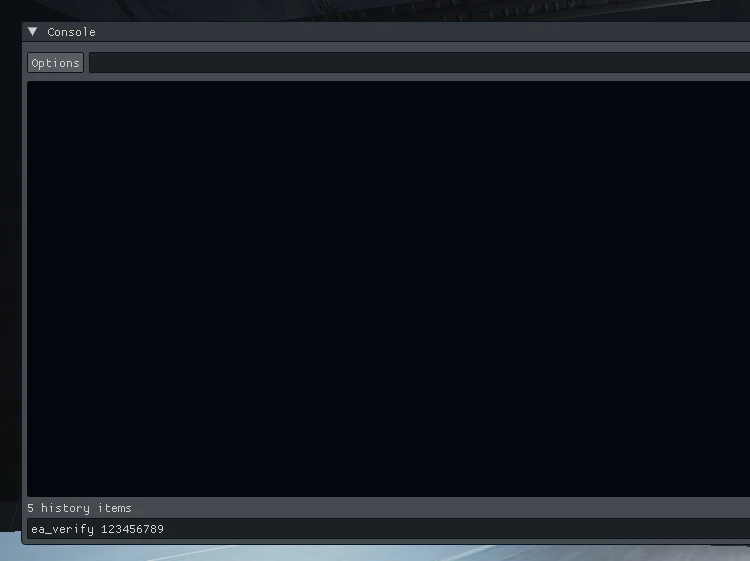 Do not enter your command into the chat. Use the console by pressing tilde on your keyboard: \`
### Discord
Link your Discord account to display it on your profile and enable easier login/recovery options.
## Support & Requests
* **Requests**: Submit requests for Name Changes or Verified Host status.
* **Support**: Open and manage moderation tickets.
* **Notifications**: Configure which alerts you receive.
## Verified Hosts
Users with **Verified** or **Helper** status gain access to the **Verified** tab, containing specialized host tools and creator perks.
Do not enter your command into the chat. Use the console by pressing tilde on your keyboard: \`
### Discord
Link your Discord account to display it on your profile and enable easier login/recovery options.
## Support & Requests
* **Requests**: Submit requests for Name Changes or Verified Host status.
* **Support**: Open and manage moderation tickets.
* **Notifications**: Configure which alerts you receive.
## Verified Hosts
Users with **Verified** or **Helper** status gain access to the **Verified** tab, containing specialized host tools and creator perks.